Final Client meetings, as well as Posts and Site Export Files (.wpress files) are due by Friday April 29.
Please try to find a Final Client Meeting time I can attend. I will post times on Slack.
Each of your Clients has different levels of expertise and need; so your work with clients is likely to reflect those differences. That main outcome of this work should be
- You’ve made some mistakes, discovered some solutions, and figured things out!! Welcome to how learning happens in the transition away from school.
- You’ve increased your skills and confidence with WordPress and building websites.
- You learned some important lessons about working on a team
- You’ve got some experience working with clients and offering your skills and advice as well as learning how to use feedback.
- You’ve developed some insights about what makes a good website that you can use for both clients and your own website.
- You’ve been able to work independently of client pressure if you have been working on a template–and trying to anticipate what a client might want–using placeholders.
Your client site should have many features similar to your portfolio site, as well as some differences. Your site should have most of the following:
- Home page–telling the best bried=f story about your client that you can manage with images and (little) text.
- About page–more detailed client description geared to good stories that would interest viewers
- Menu Navigation to key client info–for many this is an emphasis on offering or selling services products, so make action buttons that allow this on every page/post/menu…
- Client products and/or services. You should have enough of these done, so your client take over adding their own within the clear and clear structure you have provided. You may want to add a few samples templates they could use in future?
- Contact Page with social media icons if they use social media.
- Blog with a few posts about “what’s new” as well as a schedule for adding new content if this is appropriate for your client site. For example, sailing & guiding clients may want to add “monthly stories” from customers. If you set up 2-3 of these, they can use them as well as your “blog” section to build on this in the future. If not, they can eliminate the “blog” part of the menu.
- Users include me with Role: Administrator with my work email. This allows me to help client troubleshoot after the class is done.
Optional:
- Shop/Market–a few clients can benefit from an initial set up of WooCommerce plug-in. You can set up the main pages, as well as a few sample pages, and then let them fill in email, and other client info afterwards.
- Backup strategy–You should all add the All-In-One WP Migration Plugin, and activate it.
- Brief handoff tutorial for client during last meeting about how to work with Dashboard and how to add photos and text content in either pages or posts, and how to use categories, and add/change menu items.
Site export file:
- Follow export instructions from How to Migrate and upload your .wpress export file to your Slack team channel
- Also be sure your site (if online) has me as a User with Administration role. This is critical for helping clients after the class is over. Sites will be moved by the end of May, but your Dreamhost accounts need stay open through the ned of the month.
Post:
ALL students must submit a post in order to get graded & get credit for your client site as individuals. Include:
- Category; Client Site
- Client name
- Team members
- Site URL
- Your specific contributions
- What you learned from working on a team and with clients ; 1-2 paragraphs
ie What worked well on your team ( or as a solo template creator) What could be improved and how? In this process learning counts in your evaluation even when the outcome is less that you had hoped. And we often learn best from out mistakes.
]]>
Mon April 25 (-5 points. -1 point daily after that)
Post with the following:
- Title: Portfolio-yourname
- Category : Portfolio
- Featured image–a screenshot of a nice part of your portfolio
- A clickable URL for your portfolio –this must be an online (not local) Website in order for me to see and grade it.
- Any text or explanation you need
Your Portfolio should contain the following:
- Menus–with Portfolio, About Me, Contact and any other items you choose (not too cluttered, you may use sub menus or nested menus for less important items)
- Header/Footer–With a logo, menu, social icons etc.
- Homepage— with clear info about you–photos of you or your work are good here
- About Me Page– a more detailed intro to you and your skills, interests
- CV Download–upload the pdf to your Media folder then elect it in the Media Library–the URL for it will be in the lower right column; then use that link for the Download CV button.
- Contact Pop up/Page--Pop up or page for people to contact you
- Portfolio Page–this page is designed to use posts with categories to filter your projects dynamically
- Coherent, appealing Design–Design and color scheme should complement your work
- Robust Content–you dont need to refer to any classes (not professional) but DO refer to the kind of work “logo” “graphic” “code” , and use these categories.
P5js “block” can be used to ad a “block” to Post (use the Block Editor for this post):
https://www.wpfastworld.com/13/p5-js-block-wordpress-plugin-free-download/
You can also embed an animated gif, or screen shots of a P5js project.
]]>
Codepen
Update any missing or incomplete Codepen work before adding Task 10, add “revised” to your past posts so I can re-grade. Please do all revisions in next 2 weeks, unless you get permission from me because of unusual circumstances. Once done, you can move onto Task 10–the last Codepen task.
- W3schools: iframe, FilePaths, Head
- Quiz 10
- Practice CodePen HTML:
- iframe
- file paths
- Head elements
- Portfolio: Media, Social Media, Action Buttons
Portfolio
- Get Dreamhost hosting, install WordPress with WordPress–> On Click Install. Add a folder when Installing, and check OFF the 2 tick boxes.
- Once WordPress is installed, add the All-in-one Migration plug-in.
- On your local site, also add this plugin, and export your site as a file on your local computer.
- In your new online WordPress site Use the plugins (see tab in Dashboard once you activate the plugin) and IMPORT the file on your desktop.
- Post A screenshot of your online front page AND add the online URL to your portfolio.
Client
- Create you Team Slack Channel with Client #Website-name as channel name
- Post any client questions/issues that you are addressing, in this post & on Slack
- Create a “Main Menu” that will have key client pages/sections. Do this by making key pages (they can be blank), and a few sample posts (title, featured image, excerpt, category–you’ll have to create a few), This will require that you have a basic model of the website architecture, though you may not yet have styling, content, colors etc. Post a screenshot of Menu.
- Create a Home page with at least one image, and some legit text. Post a screenshot. If the client alreaydhas a homepage and you are working on a different page, you can substitute that.
- Create a list of Tasks for your Client site–with names next to each task and due dates. You can begin with a list for this week, but if you have a longer term list, that could also be helpful–even if you update it. You can distinguish Tasks in Next Week, vs Overall Tasks.
Task 10 Posts
- Subject: Task 10-yourname
- Category: Task 10 (Do not use “Task” which is reserved for my assignment instructions)
- Codepen large image showing this week’s relevant task & URL (use “HTML comments” to distinguish each codepen addition) OR say you are revising previous posts & add this later.
- Client task list with names.
- Screenshot of client page & menu
- Client URL if they have an online website already.
- Portfolio URL online, with screenshot of your front page online.
CodePen
- Quiz 9
- Practice CodePen HTML:
- table–small table with a header row, and at least 2 rows & 2 columns
- list–one with numbers and one with disc or square bullets (not circles)
- block–use a div to create a horizontal menu of at least 3 items
Portfolio
- Keep updating content & design.
- Add online URL for your site.
Client
- Client Skills list & Sign up
- Liaison: Contact client–one person on your team should call, then email
- Liaison: Set up first meeting for team (and weekly meeting schedule, and first meeting with client.
- Designer: Research and pick some Kits & Themes that could work for client (eg small farm with store, or Festival etc)
- Coder: Research and find likely plug-ins you might use according to a “functions list”–eg Events–>Event Manager, Online Shop–>WooCommerce, etc.
Task 9 Posts
- Subject: Task 9-yourname
- Codepen image & URL (use “HTML/CSS comments” to distinguish each Codepen addition)
- Portfolio URL online!! (we will get hosting in class)
- Client– (share your info with your team so you ALL post ALL of this info)
- List Team names& roles (1-Liaison/Manager/Writer, 2-Designer/Media, 3-Coder)
- Liaison: post client scheduled meeting date/time: TH or Fri this week if possible.
- Designer: add screenshot and URL for top 3 themes or Kits (use your local site to find these, as you have Elementor Pro on there)
- Coder–list possible functions/plug-ins/widgets you might use
- Quiz 8
- Practice CodePen HTML:
- use CSS to redefine and use a standard tag, like P, div, blockquote etc
- use CSS to create a class and use it twice for inline HTML
- use CSS to create two IDs and use them inline HTML
- Portfolio due before Monday of break for full credit, by friday of break for -5 points.
Please send screen shots of each of your portfolio pages, since live links are glitching
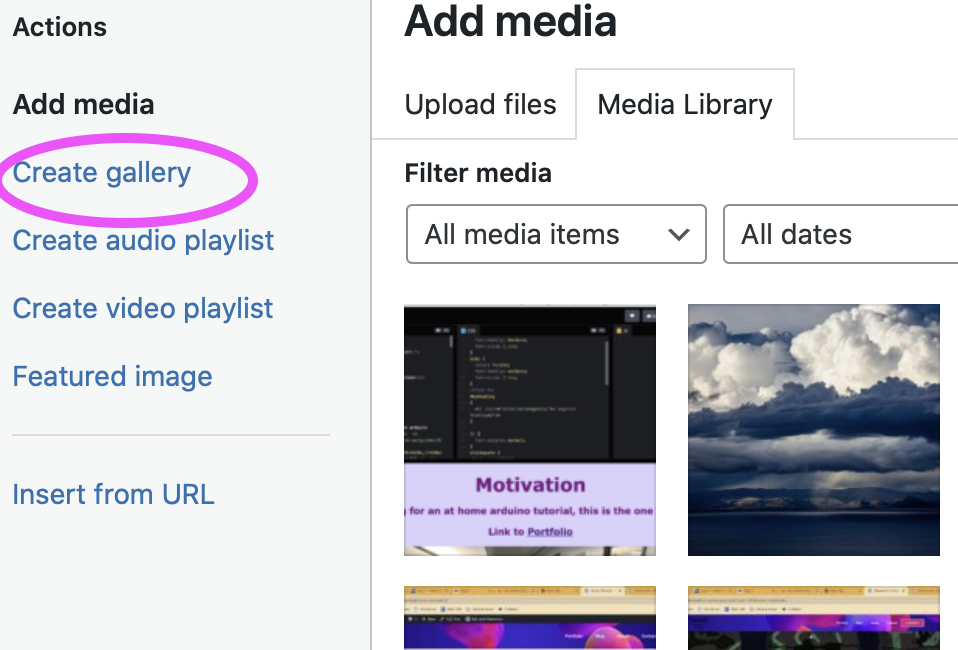
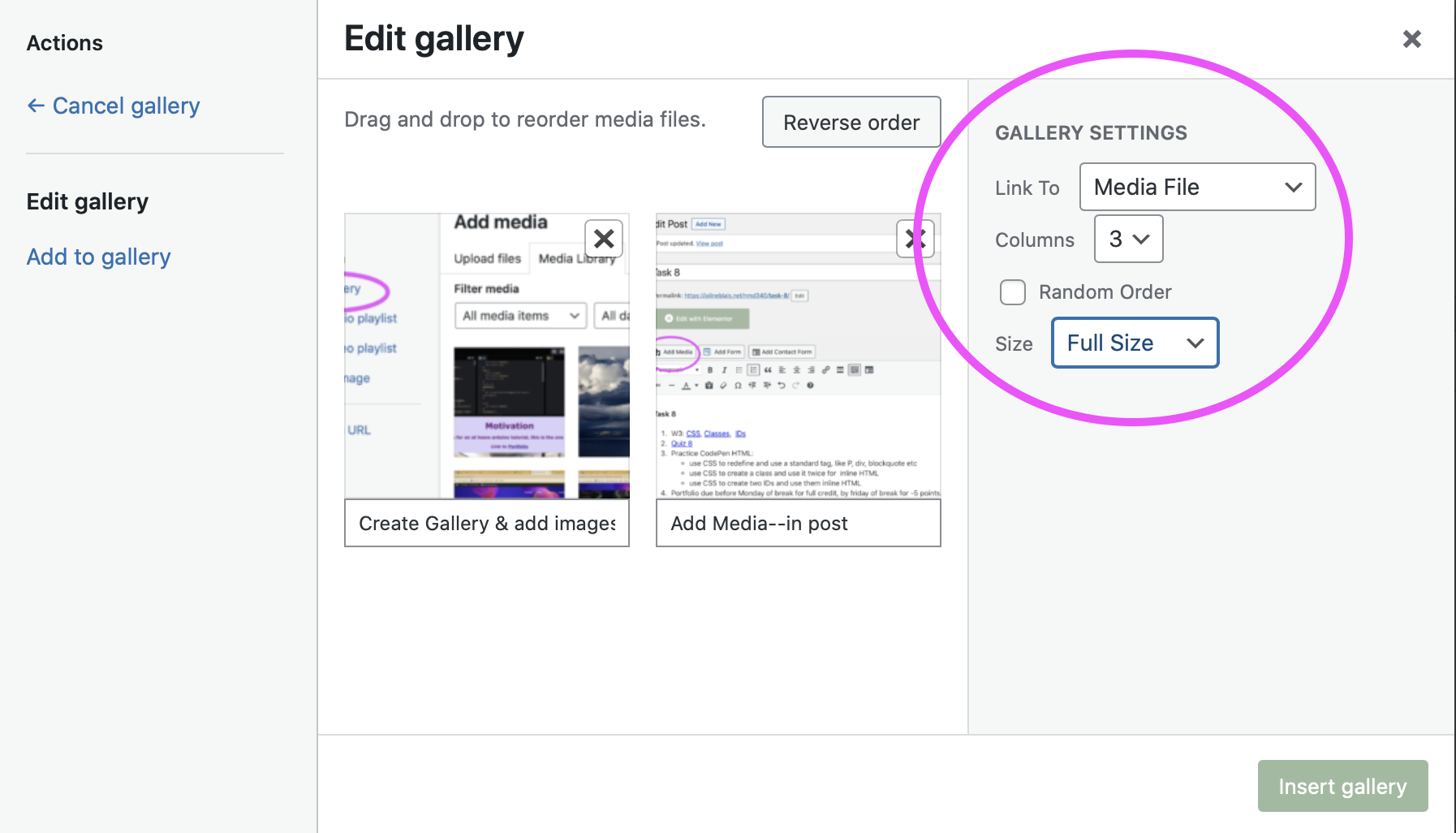
You can create a gallery in your post that has all of your images. Use the “add media” button, then the “create Gallery” link, then just upload images as usual, rearrange by dragging, and add captions for each item below.- Home page
- About Me
- Portfolio with 4 posts
- 4 Post pages with post content template
- Contact form
- Downloadable CV
See the full Elementor series for any individual video you missed.

Client
Start to think about ideas for your client’s website
Task 8 Posts
- Subject: Task 8-yourname
- Category: Task 8 (Do not use “Task” which is reserved for my assignment instructions)
- Codepen image & URL (use “HTML comments” to distinguish each codepen addition)
- Portfolio URL
-
W3: Quotations/ColorsColor Picker : https://www.w3schools.com/colors/colors_picker.asp
- Quiz 7
- Practice CodePen HTML:
- use block quote and q
- use hexadecimal background OR text colors for 2 H (header) elements
- Catch up with any Portfolio tasks:
- Elementor video 8: Project Template
- Elementor video 9: Project Post
- Elementor video 10: Portfolio Page
See the full Elementor series for ny individual video you missed.
Client
- Review the Client First Meeting page, so you get a sense of how to address clients
- I will distribute clients in class.
Post:
- Subject: Task 7-yourname
- Category: Task 7 (Do not use “Task” which is reserved for my assignment instructions)
- Codepen image & URL (use “HTML comments” to distinguish each codepen addition)
- URL to Portfolio. Make sure I can view it by testing URL on another friend’s device!!
- W3S Links and Images
- Quiz 6
- Practice CodePen HTML:
- add 2 links
- add 2 images
- add one image link
- Portfolio: Design Posts–for Projects
- Portfolio: Build PortfolioPage
Post:
- Subject: Task 6-yourname
- Category: Task 6 (Do not use “Task” which is reserved for my assignment instructions)
- Codepen image & URL (use “HTML comments” to distinguish each codepen addition)
- URL to your portfolio page–I may need to check these in class as URLs dont seem to be working
- use 3 style attribute elements like background-color, text colors, fonts, text sizes, or text alignment
- use 3 formatting elements, like bold, italic, marked, superscript, etc.
- Update responsive design–for mobile & tablet (this may just need minor padding adjustments)
- Design Single Post Template–for Projects
- Create 4 “blank posts” for your 4 best projects in each four categories, give each post a name, featured image, tile and category. We will use these next week. Do this even if you already have a post for that project–this will allow you to re-design the page. You can use current categories if you have at least four.
Post:
- Subject: Task 5-yourname
- Category: Task 5 (Do not use “Task” which is reserved for my assignment instructions)
- Codepen image & URL (use “HTML comments” to distinguish each codepen addition)
- URL “livelink” to your portfolio
-
W3: Style Guide
- Quiz 12
- Practice CodePen HTML:
- style guide
- update style guide elements
- Portfolio: update your portfolio
Client
Meeting Date: Set client final meeting date between April 26-May 5, The sooner you finish site & set date, the sooner you will be done!!
Deliverables: Add a list to this post of your final deliverables. Also add this list to your Dashboard WP Dashboard notes (add this plugin if you dont have it, and then use the +note in the very top right of Dashboard to add first note) , so we cal all see them.
Task 12 Posts
- Subject: Task 12-yourname
- Category: Task 12 (Do not use “Task” which is reserved for my assignment instructions)
- Client Meeting date
- Client site URL–with list of deliverables the post as well as In the WP Notes in the site Dashboard (so your client can also see)
- Trello URL
- Portfolio URL
-
W3: Layout, Responsive Design
- Quiz 11
- Practice CodePen HTML:
- Take a look at W3.CSS templates–free HTML?CSS code for typical websites
- Add WP Dashboard notes plugin to Portfolio & Client site
- Client website: Showcase
Client
Meet with Client and me
- Asses what can be done that’s most useful in next 2 weeks
- Deliverables list?
Task 11 Posts
- Subject: Task 11-yourname
- Category: Task 11 (Do not use “Task” which is reserved for my assignment instructions)
- Codepen image & URL (use “HTML comments” to distinguish each codepen addition)
- Portfolio URL with other class materials added (via menu & posts)
- Client site URL–explaining any changes, additions, tests
- Trello URL